Administration
Departments and membership
Maintain the teams used for workflow ownership and task handovers.
- Who can use it
- Users with management access.
- Where to find it
- Administration > Users and departments. Departments appear as group headings in the user directory; the old departments page opens the same screen.
Step by step
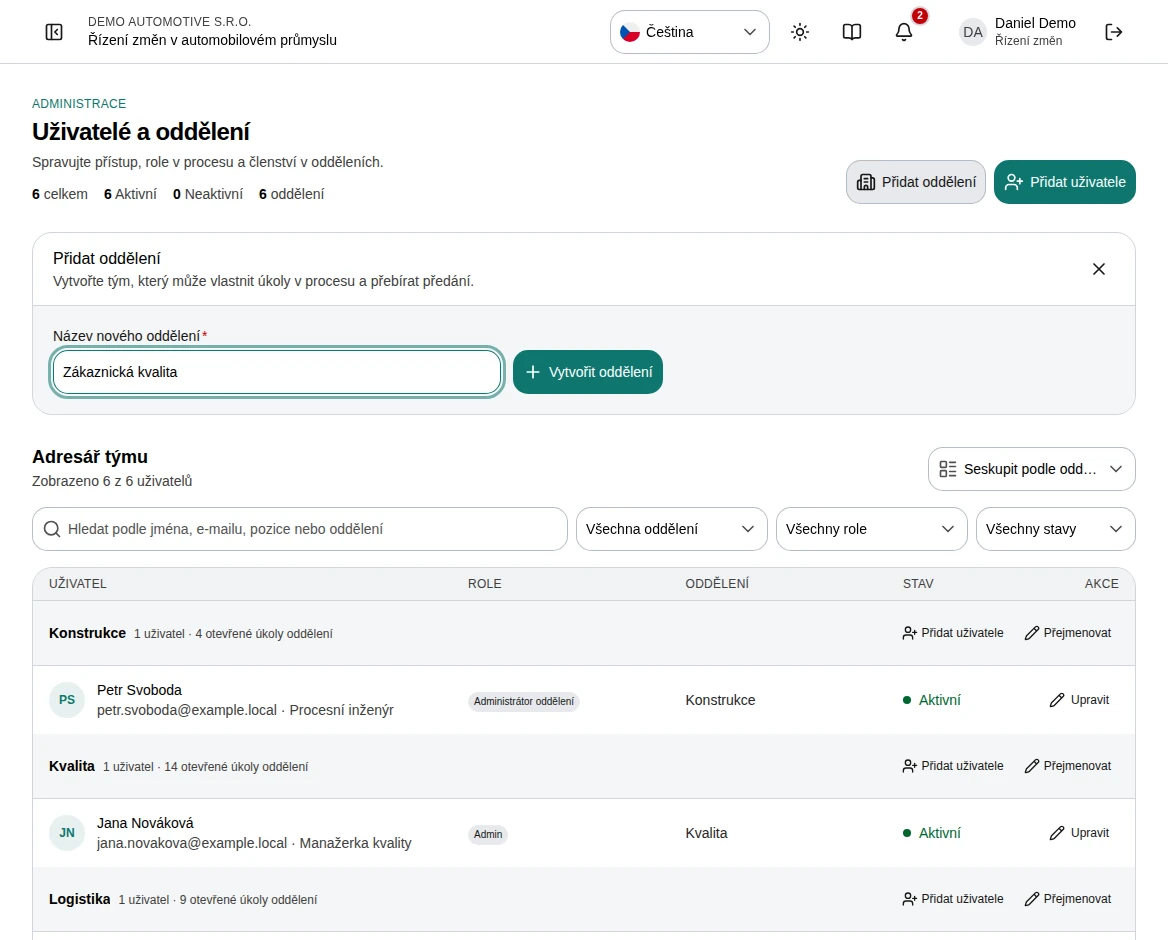
Choose Add department at the top of the page, enter the name, and create it.
Group the directory by department to see each department with its users and open task count. Departments without users are listed too while no search, role, or status filter is active.
Use Add user in a department heading to create an account already assigned to that department.
To rename a department, choose Rename in its heading and type the new name. The change saves automatically.
To remove a department permanently, choose Delete in its heading and confirm. Its members move to No department.
Use the department in workflow tasks and handovers.
 Enlarge screenshot
What to know
Renaming
Members and current task ownership move to the new department name. Historical handover text remains unchanged so the record keeps its original context.
Workflow prerequisite
Tasks in workflow templates require an owning department. Set up departments before designing a new process.
Deleting
A department cannot be deleted while a workflow template task belongs to it or while it has open tasks. Reassign the template tasks and finish or hand over the open tasks first. Completed tasks keep the department name in their history. Users without a department are listed under No department.